本文章仅用作于学习
背景:最近期末到来,想第一时间看到新出成绩的,但教务系统处必须得等到学期结束才能看到,于是就有了想到爬取学校教务系统来获取自己的成绩,目前完成了模拟登录的阶段。
因为大部分网站都可以通过CAS进行授权登录,所以只要登录了,就可以方便地完成一些机械化的操作。可以导出课表、成绩单、抢课。
之后有时间的话,可以补充一些真正有用的应用。
目录
- 新教务系统
- 旧教务系统
新教务系统
分析登录请求
首先进入新教务系统首页,打开F12,输入账号密码进行测试。
提交的表单数据如下: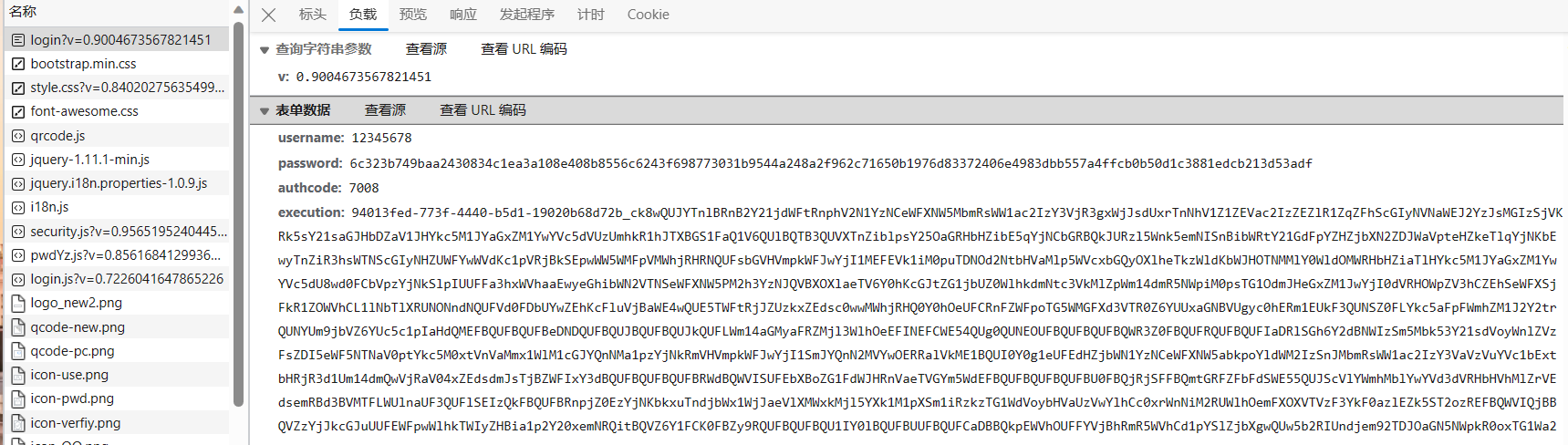
可以看到,username就是学号,password不是密码的明文,可能是经过了哈希或者加密,authcode是图片验证码,_eventId 应该是提交的意思,而最长的execution看不出有什么含义。
通过查看网页源代码,可以看到登录表单中有一项
就是execution的内容,可以看出,每次请求页面的时候会返回execution,在登录时带着这一项提交,作用可能是防止csrf攻击(猜的)。
那么就只剩下密码这一个参数了。
如果前端通过js加密密码,必然要先从input框中先获取密码的内容,于是先找到密码框的html代码

然后在source中全文搜索password关键字,发现login.js中有一段这样的代码
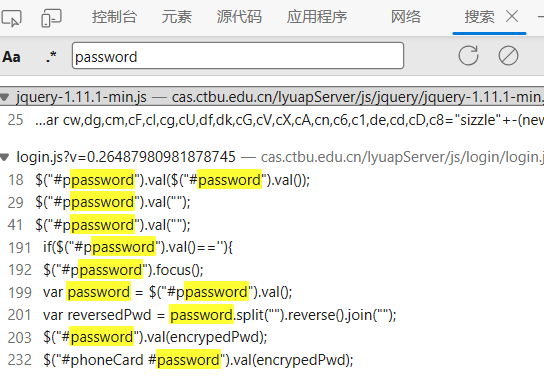
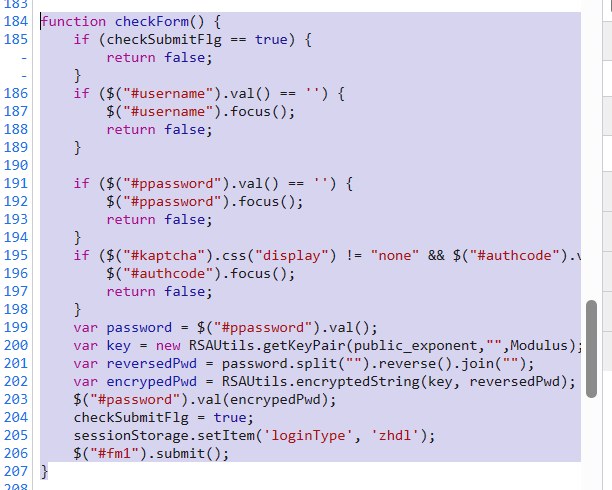
可以看到这段代码先进行一些字段检查,再把密码加密填写回`password`,最后再执行submit提交到后台。
继续搜索加密中用到的`RSAUtils`
再观察到201行,需要传入public_exponent和Modulus作为参数,继续搜索
也找到了来源,是向v2/getPubKey发送请求后得到。
然而多次尝试后都无法登录,遂暂时放弃此方法。
8.30更新
在对整个登录过程完整抓包分析后,发现了部分遗漏的参数,即post提交时v的值。
同样使用搜索后,发现也是在网页源代码中
同时,在每次发送请求时都会携带第一次访问时返回的cookies
9.2更新
多次尝试后,都会重定向到学校的信息门户,而不是强智的教务系统
又经过一番分析,重定向的url收到最开始的service影响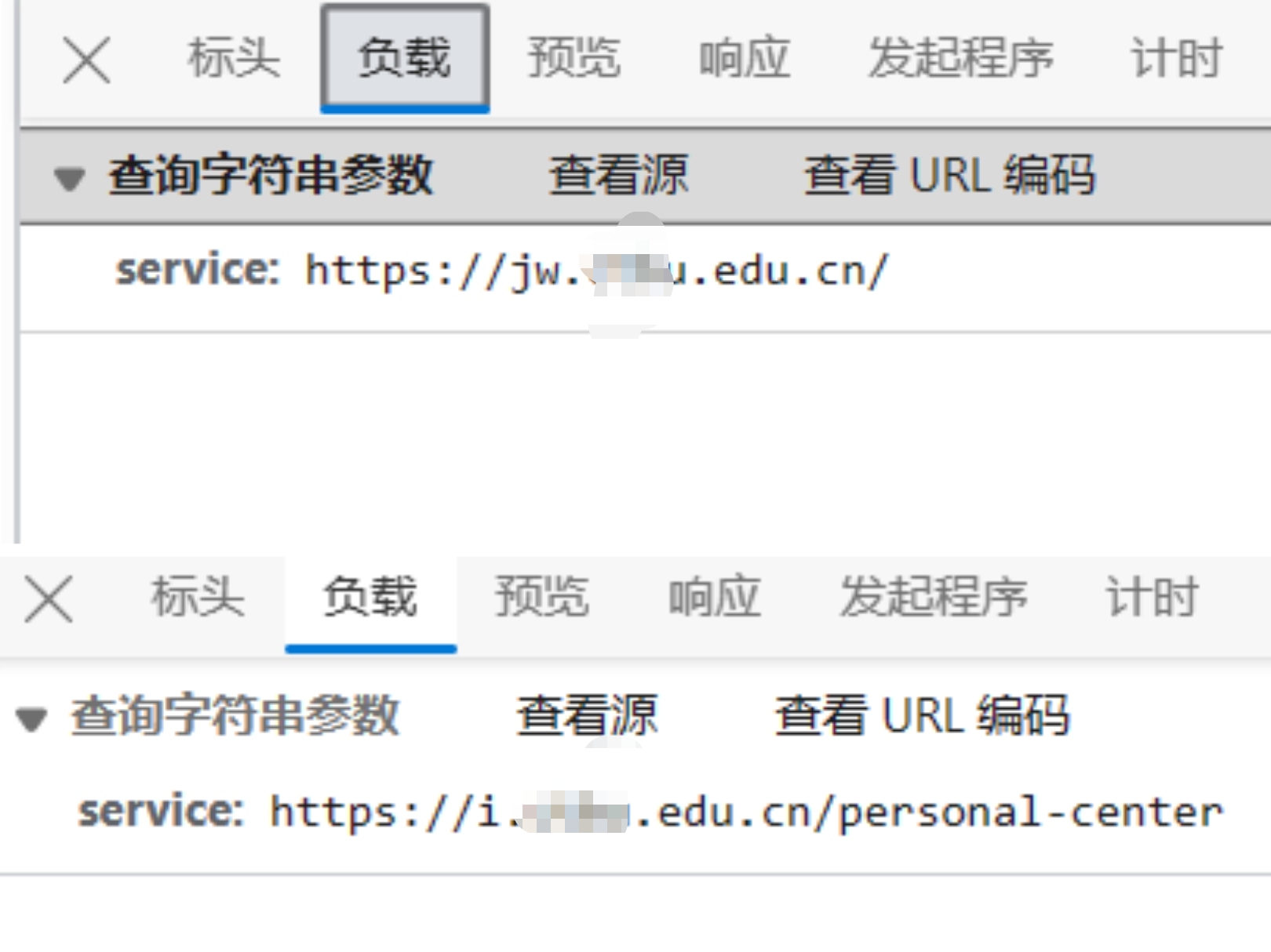
所以需要加上params。最后从response.history里找到最后的重定向url。
代码实现
至此,整个登录的流程已经梳理清楚了,开始使用代码实现
1.先访问页面并提取execution和v
1
2
3
4
5
6
7
8
| url = "https://cas.xxx.edu.cn/lyuapServer/login"
params = {
"service": "https://jw.xxx.edu.cn/"
}
response = requests.get(url,params=params)
execution = re.search(r'name="execution" value="(.*?)"', response.text).group(1)
v_value = re.search(r'action=".*\?v=(.*)"\s', response.text).group(1)
cookies = response.cookies.get_dict()
|
2.获取密码加密需要的参数及加密密码
1
2
3
4
5
6
7
8
9
10
11
12
13
14
15
16
17
18
19
20
21
22
23
| def get_public_key():
url = "https://cas.xxx.edu.cn/lyuapServer/v2/getPubKey"
try:
response = requests.get(url,cookies=cookies)
modulus = response.json()['modulus']
public_exponent = response.json()['exponent']
cookies_pv0 = response.cookies.get_dict()
return modulus, exponent, cookies_pv0
except requests.exceptions.RequestException as e:
print("Error: ", e)
def encrypt_password(public_exponent, modulus, password):
password_bytes = bytes(password, 'ascii')
password_int = int.from_bytes(password_bytes, 'big')
e_int = int(public_exponent, 16)
m_int = int(modulus, 16)
result_int = pow(password_int, e_int, m_int)
encrypted_password = hex(result_int)[2:].rjust(128, '0')
return encrypted_password
modulus, public_exponent, cookies_pv0 = get_public_key()
encrypted_password = encrypt_password(public_exponent, modulus, password)
|
3.获取图片验证码
1
2
3
4
5
6
7
8
9
10
11
12
13
14
15
16
17
18
19
20
| def get_captcha():
timestamp = int(time.time()* 1000)
url = "https://cas.xxx.edu.cn/lyuapServer/kaptcha"
params = {
"_": timestamp,
}
try:
response = requests.get(url, params=params, cookies=cookies)
if response.status_code == 200:
save_path = "captcha.png"
with open(save_path, 'wb') as file:
file.write(response.content)
print("图片已保存:", save_path)
authcode = input("请输入验证码:")
return authcode
else:
print("无法获取图片:", url)
except Exception as e:
print("错误:", e)
|
4.发送登录请求
1
2
3
4
5
6
7
8
9
10
11
12
13
| cookies = {**cookies, **cookies_pv0}
url = "https://cas.xxx.edu.cn/lyuapServer/login"
params = {
"v": v_value,
}
data = {
'username': username,
'password': encrypted_password,
'authcode': authcode,
'execution': execution,
'_eventId': 'submit'
}
response = requests.post(url, params=params, data=data, cookies=cookies)
|
5.重定向到教务系统
1
2
3
4
5
6
| cookies = response.history[3].cookies
url = "https://jw.xxx.edu.cn/jsxsd/framework/xsMain_new.jsp"
params = {
"t1" : "1"
}
response = requests.get(url, cookies=cookies, params=params)
|
完整代码
1
2
3
4
5
6
7
8
9
10
11
12
13
14
15
16
17
18
19
20
21
22
23
24
25
26
27
28
29
30
31
32
33
34
35
36
37
38
39
40
41
42
43
44
45
46
47
48
49
50
51
52
53
54
55
56
57
58
59
60
61
62
63
64
65
66
67
68
69
70
71
72
73
74
75
76
77
78
79
80
81
82
| import requests
import re
import time
url = "https://cas.xxx.edu.cn/lyuapServer/login"
params = {
    "service": "https://jw.xxx.edu.cn/"
}
response = requests.get(url,params=params)
execution = re.search(r'name="execution" value="(.*?)"', response.text).group(1)
v_value = re.search(r'action=".*\?v=(.*)"\s', response.text).group(1)
cookies = response.cookies.get_dict()
def get_public_key():
url = "https://cas.xxx.edu.cn/lyuapServer/v2/getPubKey"
try:
response = requests.get(url,cookies=cookies)
modulus = response.json()['modulus']
public_exponent = response.json()['exponent']
cookies_pv0 = response.cookies.get_dict()
return modulus, public_exponent, cookies_pv0
except requests.exceptions.RequestException as e:
print("Error: ", e)
def encrypt_password(public_exponent, modulus, password):
password_bytes = bytes(password, 'ascii')
password_int = int.from_bytes(password_bytes, 'big')
e_int = int(public_exponent, 16)
m_int = int(modulus, 16)
result_int = pow(password_int, e_int, m_int)
encrypted_password = hex(result_int)[2:].rjust(128, '0')
return encrypted_password
def get_captcha():
timestamp = int(time.time()* 1000)
url = "https://cas.xxx.edu.cn/lyuapServer/kaptcha"
params = {
"_": timestamp,
}
try:
response = requests.get(url, params=params, cookies=cookies)
if response.status_code == 200:
save_path = "captcha.png"
with open(save_path, 'wb') as file:
file.write(response.content)
print("图片已保存:", save_path)
authcode = input("请输入验证码:")
return authcode
else:
print("无法获取图片:", url)
except Exception as e:
print("错误:", e)
username = ''
password = ''
modulus, public_exponent, cookies_pv0 = get_public_key()
authcode = get_captcha()
encrypted_password = encrypt_password(public_exponent, modulus, password)
cookies = {**cookies, **cookies_pv0}
url = "https://cas.xxx.edu.cn/lyuapServer/login"
params = {
"v": v_value,
}
data = {
'username': username,
'password': encrypted_password,
'authcode': authcode,
'execution': execution,
'_eventId': 'submit'
}
response = requests.post(url, params=params, data=data, cookies=cookies)
cookies = response.history[3].cookies
url = "https://jw.xxx.edu.cn/jsxsd/framework/xsMain_new.jsp"
params = {
"t1" : "1"
}
response = requests.get(url, cookies=cookies, params=params)
|
旧教务系统
偶然发现在教务系统退出后会被重定向到旧版的教务系统处,似乎所有强智教务都有这个入口。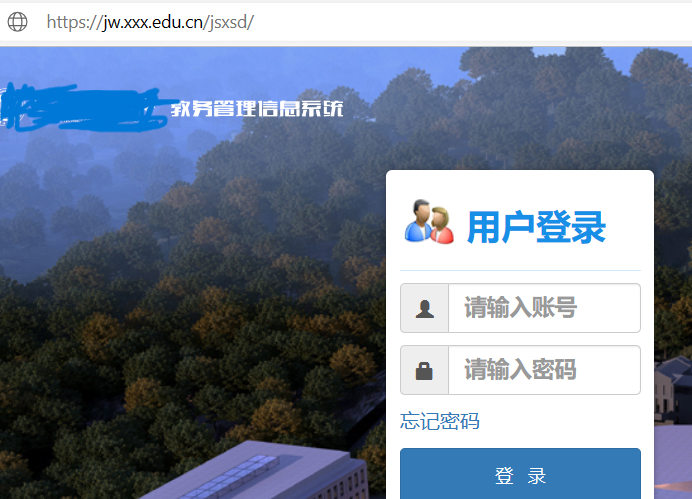
输入账号密码进行登录
————失败。提示 用户名或密码错误,
————忘记密码也不可使用。提示 该帐号没有设置密码找回信息,无法完成该操作!
8.30更新
尝试了众多密码后,我意识到,也许旧教务系统内储存的密码可能和OA系统内的不一致,于是我去学校网站上搜索新教务系统,有了一些眉目。
关于征集正方教务系统使用意见的通知
软件集成服务-信息化办公室
教务处召开学期选课工作视频协调会
根据这些信息,我推测我校在16年之前都是使用的正方教务,在17年更换了强智教务,随后又在20年引入OA系统。
9.3更新
根据上述推测,我认为在引入OA系统后,旧教务系统可能没有及时更新,储存的是默认密码。
而教职工及学校的学工号都是进校年份,我觉得20年之后入学的都为默认密码。
经测试,的确和我想的一样,以2020打头的学工号都可以用默认密码登录。
分析登录请求
不妨大胆猜测,旧教务系统的默认密码就是学号。
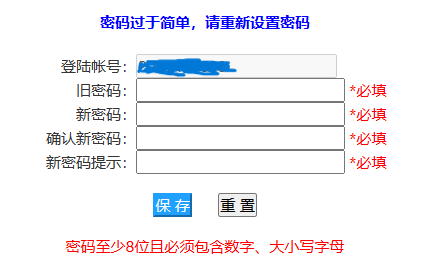
成功登入,并进入修改密码页面。的确,在修改密码之后,可以绕过OA系统,直接进入教务系统。
至此,剩下的内容就比较简单了。同样打开F12,输入账号密码进行测试。
会看见userAccount和encoded被提交到了一个LoginToXk的接口,提交的数据也就只有账号密码,账号明文而encoded暂不知,猜测是某种加密,好在加密方式比较好找,源代码里直接就能找到。
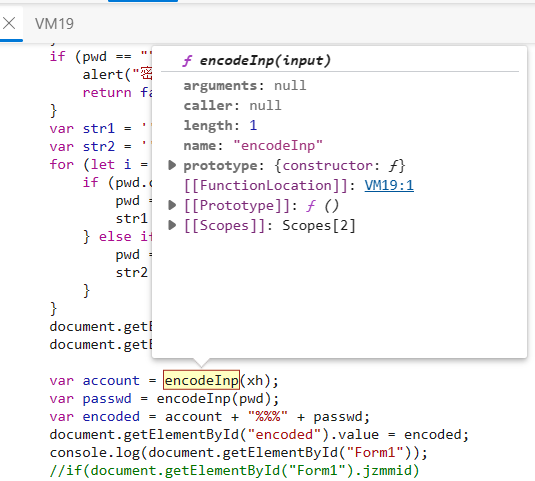
定位到函数位置。
1
2
3
4
5
6
7
8
9
10
11
12
13
14
15
16
17
18
19
20
21
22
23
24
25
| var keyStr = "ABCDEFGHIJKLMNOPQRSTUVWXYZabcdefghijklmnopqrstuvwxyz0123456789+/=";
function encodeInp(input) {
var output = "";
var chr1, chr2, chr3 = "";
var enc1, enc2, enc3, enc4 = "";
var i = 0;
do {
chr1 = input.charCodeAt(i++);
chr2 = input.charCodeAt(i++);
chr3 = input.charCodeAt(i++);
enc1 = chr1 >> 2;
enc2 = ((chr1 & 3) << 4) | (chr2 >> 4);
enc3 = ((chr2 & 15) << 2) | (chr3 >> 6);
enc4 = chr3 & 63;
if (isNaN(chr2)) {
enc3 = enc4 = 64
} else if (isNaN(chr3)) {
enc4 = 64
}
output = output + keyStr.charAt(enc1) + keyStr.charAt(enc2) + keyStr.charAt(enc3) + keyStr.charAt(enc4);
chr1 = chr2 = chr3 = "";
enc1 = enc2 = enc3 = enc4 = ""
} while (i < input.length);
return output
}
|
明显,这是一个base64编码。然后encoded也在下方做了说明var encoded = account + "%%%" + passwd;,
代码实现
所以直接写个函数,将encoded进行base64编码,然后返回。
1
2
3
4
5
6
7
8
9
10
11
12
| import base64
def encodeInp(input):
encoded_bytes = base64.b64encode(input.encode('utf-8'))
output = encoded_bytes.decode('utf-8')
return output
def encode(xh, psw):
account = encodeInp(xh)
passwd = encodeInp(psw)
encoded = account + "%%%" + passwd
return encoded
|
接下来简单写个请求就完成了。
1
2
3
4
5
6
7
8
9
10
11
12
13
14
15
16
17
| url = "https://jw.xxx.edu.cn/jsxsd/"
response = requests.get(url)
cookies = response.cookies.get_dict()
xh = input("账号:")
psw = input("密码:")
encoded = encode(xh, psw)
url = "https://jw.xxx.edu.cn/jsxsd/xk/LoginToXk"
data = {
"userAccount": xh,
"userPassword": "",
"encoded": encoded,
"pwdstr1": "",
"pwdstr2": "",
}
response = requests.post(url, data=data, cookies=cookies)
|
至此,教务系统的模拟登录就结束了。